Dithered images and neoclassical references keep showing up in the tech websites and design work I’ve been saving this year. Greek mythology is turning up in product names too, including Hermes Agent. Alongside that, Liquid Glass and folding phones have me thinking about a return to interfaces that borrow from physical objects.
These are a few of the trends I’ve been noticing, and I’ll add to this throughout the year. I’m keeping the references on my 2026 Design Trends board.
01 · DITHERING
Dithering and pixel art
Dithering is especially noticeable on photographs and images of sculptures. A marble face reduced to black and white can still show the cheek, the eye socket, and the light falling across the nose. Small patterns of pixels carry the shading.
The effect works by placing colors from a limited palette beside each other. As GIMP explains, those clusters suggest tones the palette doesn’t contain. With black and white, a denser patch of black pixels looks darker; a lighter patch looks gray when you step back.

Grayscale, ordered dithering, and round-dot halftone applied to the same image. The enlarged eye shows how the patterns build the shading in each treatment.
Dithering is a technique used in pixel art, and Aseprite includes patterns for it. You can also apply it to a photograph, which is why a photo can have that pixel-art treatment without being drawn pixel by pixel.
I thought circles versus squares might be a quick way to tell dithering and halftone apart. It helps with these particular examples, but halftone patterns can also use squares and diamonds. Here, the ordered dither uses a repeating arrangement of individual pixels, while the round-dot halftone changes the size of the spots to build the shading.
Bitmap and pointillism can look similar at first. Bitmap describes a pixel-based image, with Photoshop’s Bitmap mode specifically using black and white; pointillism comes from painting with separate touches of color. Neither term, by itself, tells you whether a digital image has been dithered.

02 · NEOCLASSICAL REFERENCES
Neoclassical imagery and Greek mythology
Some of the dithered sculptures sit within a broader use of Greek and Roman references. Marble figures appear alongside temples, gardens, and rows of columns. The neoclassical style draws on those older forms, and the columns are one of the clearest details to look for.
The grooves running down a column are called flutes. At the top, the Ionic order has paired scrolls, while Corinthian capitals have carved leaves. Those details give the architecture a recognizable identity, even when the image uses a limited palette or a digital texture.

The repeating columns make the architectural reference easy to recognize. Their pale stone stands out against the blue sky and dark cypresses.

Columns and their reflections remain readable through the pixel shading. The soft peach and blue palette changes the mood of the same architectural motifs.

Fluted shafts and leafy Corinthian capitals frame the view. The digital pattern runs through the stone, water, and sky.

Columns, a carved urn, and a reflecting pool carry the classical references into a garden setting.
Greek mythology is showing up in naming as well. Hermes Agent, from Nous Research, pairs its name with a many-armed figure, radiating lines, tall white type, and an intense blue background. The name and artwork put mythology at the front of the product’s identity.
Hermes is the messenger of the Greek gods. For an AI agent, that name brings an association with communication before you’ve read what the product does. That’s a choice about brand narrative as well as naming.
The architecture and mythology can appear together, but a Greek name alone doesn’t make a brand neoclassical. I’m noticing both in tech, and the combination of older references with digital image treatments is what connects them to the dithered work above.
03 · INTERFACES
Liquid Glass
The glass controls I’ve been saving take a different approach to texture. Apple’s Liquid Glass, introduced in 2025, brings translucency, refraction, and movement into the interface. It’s one of the references behind the glass treatments I’m seeing in 2026.
The material changes what you see underneath it. Content bends through the curved edges, light defines the rim, and the controls respond to their surroundings and to touch. Those details help a button or a toolbar appear to sit above the content.

The green shape stays sharp outside the capsule. Through the glass, its edge softens and its apparent shape changes.
Skeuomorphism on folding phones
Glass gives an interface the appearance of a material. A folding phone adds another possibility, because the way you hold or place it can change the layout. With the iPhone Duo, I think that could give skeuomorphism more room to return.
Skeuomorphism borrows the appearance and familiar controls of physical objects. A piano app has keys you can play; a camera interface can have dials that resemble the ones you’d turn on a camera. A foldable lets those controls relate to how the device is being used, too.
A Game Boy-style interface could place the game above the fold and a directional pad and buttons below it. The lower part becomes the area you hold and control, while the upper part keeps the game in view. When you open it flat or change its orientation, the layout would need to adjust so the controls remain comfortable to reach.

Sampler pads, handheld game controls, and manual camera dials translated onto the Duo’s displays. The camera controls are oriented for landscape use.
These are interface concepts I’ve put together to explore that possibility. Apple hasn’t announced these particular game, music, or manual-camera interfaces.
Music gives us an existing example in GarageBand’s Touch Piano. You tap a keyboard on the screen to play it. On a folding phone, the keys or sampler pads could occupy the lower half while the recording or arrangement stays visible above.
The same idea could change the experience of taking a photo. In the camera concept below, the phone sits on a table with the viewfinder upright and the shutter, focus, and exposure controls on the lower screen. You could adjust the shot, set a timer, and join the family without finding something to prop the phone against.
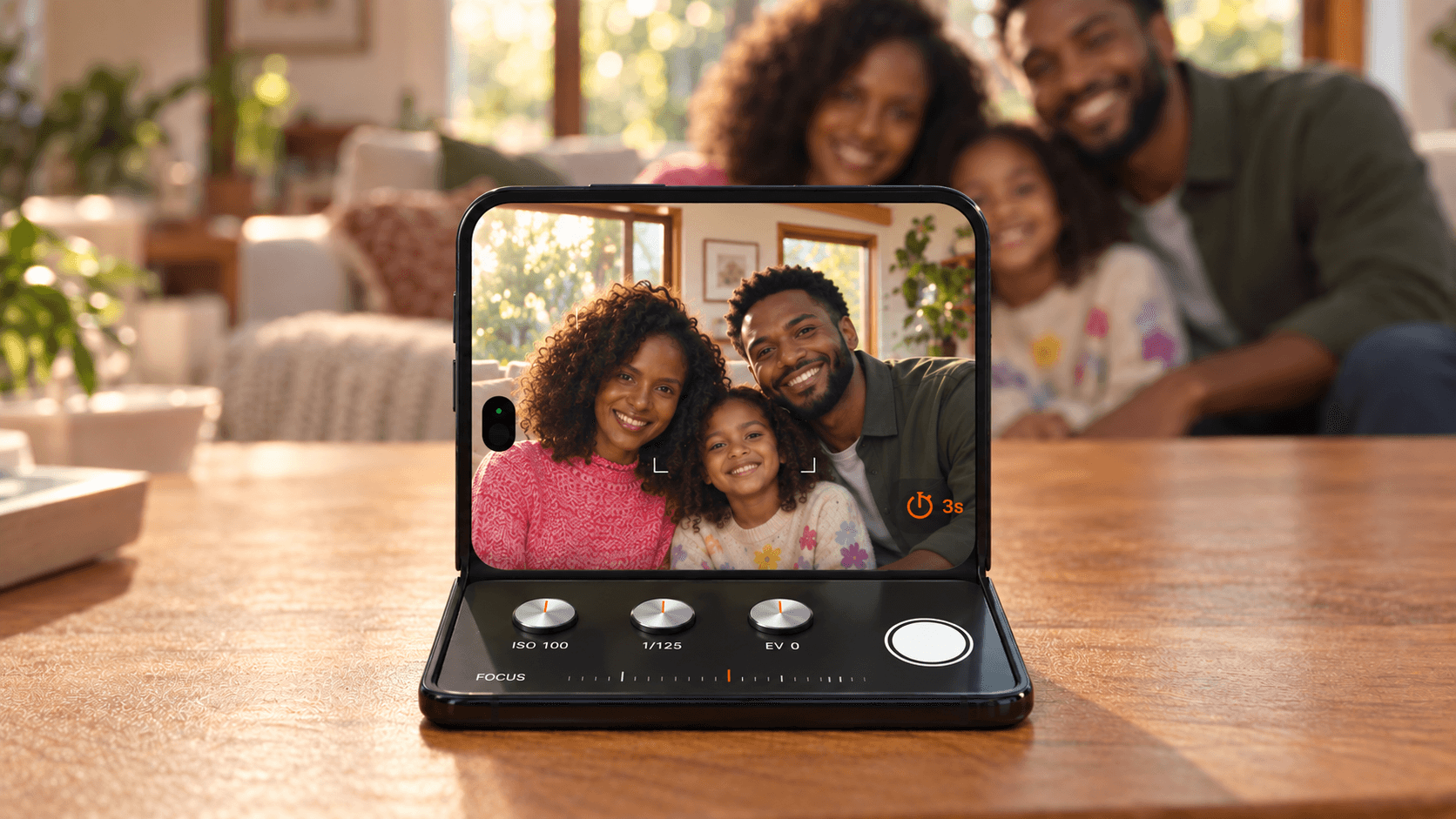
The upright screen frames the family, while the lower screen keeps the shutter and manual controls within reach.
The appeal here is being able to open the phone, put it down, and have the interface fit what you’re doing. Familiar keys, buttons, and dials could make those different uses feel more natural. How well they adapt as you fold or turn the phone would be a big part of making that work.
Illustrations and interface concepts by myself, made with AI from selected visual references. The Liquid Glass study is based on a reference by Apo Branding. The Duo concepts use Apple product imagery.

RECOMMENDED READING